Agent-First Software: Three Table-Stakes Principles for AI-First Products
Agent-first is the new mobile-first. The clearest sign a product is ready for it is almost embarrassingly small: can you get your data out in a single click, cleanly and completely, no matter whether you are a human or you are an agent?
Agent-first is the new mobile-first. The clearest sign a product is ready for it is almost embarrassingly small: can you get your data out in a single click, cleanly and completely, no matter whether you are a human or you are an agent?
The thesis I am making is that agent-first is the new mobile-first
The next wave of software has not been defined by more features. It is defined by systems an agent can operate, compose, and trust without a human having to guide every step of the way.
There are really two ideas here, and they’re easy to blur together. The first is for humans: I should be able to pipe data out of one tool and feed it into another in a few quick clicks. The second is for builders: UI (user interface) is only one interface. We have the UI, the interface humans see. We have the PI, the programmatic interface, which is exactly why APIs matter so much now. And increasingly we have the AI, which I’d argue stands as much for “agent interface” as it does for “artificial intelligence.” Treat all three as first-class, or watch your product accumulate disgruntled users.
If you believe AI is going to be a real teammate, the job of a product changes. It stops being “delight the user in the UI” and becomes “deliver a reliable outcome through any interface, human or machine.” This is not an argument to remove UX. It’s an argument to widen it, until UX covers the operator you can’t see yet: the assistant, the workflow, the script, the agent.
Here’s my litmus test:
If I can’t get my data out cleanly, in one shot, without loss, the product doesn’t really trust me with my own information. And if it doesn’t trust me, my agents can’t trust it either.
It sounds like a small ask. “Make it easy to pull data out” is hardly a grand vision. But the smallest features are often the most used and give away everything needed from a system, and the points below follow from this single idea.
Three principles
1. One-click, lossless export, for a human or an agent
“Export” cannot mean “print to PDF and good luck.”
The bar is simple: hand over the raw, structured data (JSON or CSV) and a clean, human-readable version (Markdown or plain text), in a single click. Don’t trap it behind a widget, and don’t make anyone scrape the screen to rebuild it. People will always find a way to get their data out; the only real question is whether you respect their time or waste it.
Capture data exports in their most efficient form, too. Export the minimum that still carries the meaning, the IDs, timestamps, and relationships that matter, and nothing more. Redundant fields aren’t free; downstream, an agent pays for every one in tokens, latency, and noise. A one-shot copy-paste that gives a human or an agent exactly what it needs, in the leanest complete form, is the whole game. Trap the data and you haven’t built a platform. You’ve built a cul-de-sac.
2. Your API is a primary interface now, not a side door
An “API” that’s rate-limited into uselessness, inconsistently modeled, or quietly incomplete isn’t an API. It’s marketing.
The real interface to your product is its data model, and the API is where you keep that model honest: stable IDs and permalinks, so every object can be referenced and orchestrated; full parity between what the UI can do and what the API can do; and limits documented plainly. When the model is this explicit, the UI becomes replaceable, in the best possible way.
Then do what the best API companies have always done: show, don’t tell. The old gold standard was a docs page with the same call written out in five languages, ready to copy. The next step is documentation an agent can read and run. Here is an example of Formspree doing this well.
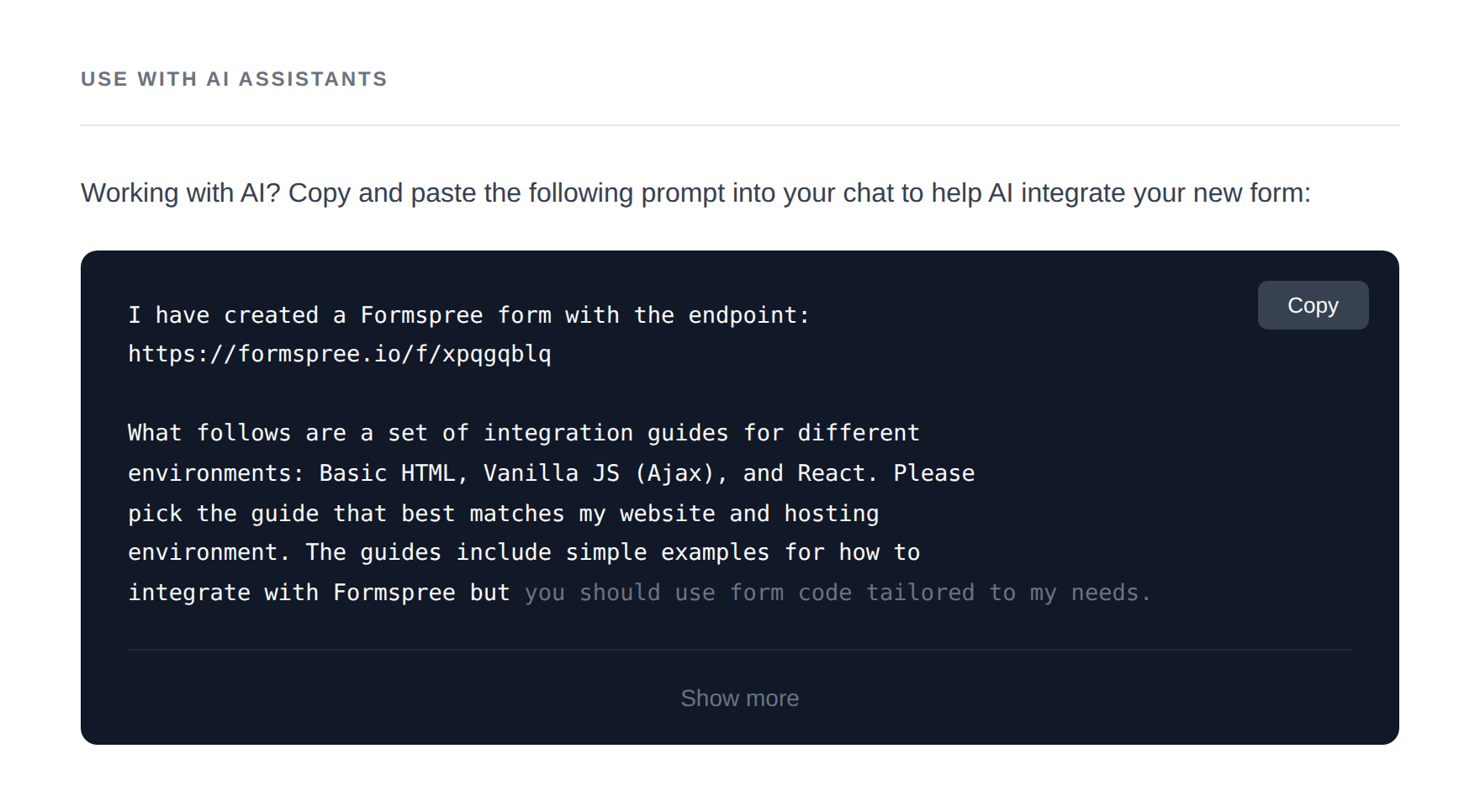
Formspree’s “Use with AI Assistants” panel: one click copies a ready-made prompt, endpoint included, straight into your AI chat, bundled with integration guides for plain HTML, vanilla JS, and React.
That is the next step of user-friendly documentation. And it’s worth pointing AI at the specs themselves: enriching, maintaining, and stress-testing them is precisely the kind of work it’s good at.
3. Change feeds, not polling
Agents need to react the moment something changes, and polling for that is wasteful, brittle, and expensive, like refreshing your inbox every thirty seconds forever. Give them webhooks and cursor-based change feeds, with the boring guarantees that make them trustworthy: replay, dedupe, idempotency. That’s the difference between an agent that waits and an agent that responds.
A critique, no names: the calendar problem
Calendars are the cleanest example of UI-first thinking that hasn’t caught up. The moment a calendar makes export partial or lossy, locks event metadata in, or quietly discourages programmatic create-and-edit, it stops being neutral infrastructure and becomes a wall. A calendar isn’t a calendar anymore; it’s a shared coordination database for humans and agents at once, handling scheduling, resource allocation, work routing, and compliance logging. Constrain the integration and you don’t just annoy me, you constrain every use case someone might have built on top of it.
The assistant layer is catching up unevenly. Gemini still feels a step behind here, while Notion AI has genuinely impressed me as a copilot sitting on top of a calendar. That gap is the point: the products that open up are the ones that win the assistant.
You don’t need full orchestration to win
The agent-first future is already partly here, and you don’t have to build all of it to benefit. Plenty of products already ship genuinely good chatbots, accurate and grounded and useful, so the hardest surface is no longer the blocker. What’s missing is the plumbing between apps. In the instant-attention, one-shot culture we live in, you often don’t need a full integration to bridge that gap. One-click canned options, “copy this as context,” “send this summary over there,” are enough to port the data that actually matters from one app into the next.
Full seamless integration is possible, and orchestration frameworks will get you there. But for the ad hoc case, manual integration isn’t the enemy; a three-click workflow is perfectly acceptable. Especially now that voice-to-text has gotten good. With a tool like WisprFlow I can move synthesized context from one place to another just by saying it, paying far less of the context-switching tax and getting a quick summary of what was carried across.
It all loops back to the first principle. If your data comes out clean, it hardly matters whether the thing moving it is a polished orchestration layer or a tired human with a voice tool and three clicks to spare. Clean data travels both ways.
Design for the operator you can’t see yet
The best products of the next decade will be easier for an agent to operate than for a human. Not because humans stop mattering, but because the model underneath is clean and the surfaces are open.
“Just make export easy” sounds like a small ask. It’s really a test of intent. The honest API, the change feed, the clean export all fall out of one decision: to treat your users’ data as theirs, and to let it move. As intelligence gets cheaper by the month, that openness is the moat, and interoperability is what turns a product from a destination into a node in something larger.
So if you’re shipping software today, you’re not just designing screens. You’re signing an ecosystem contract. Make it easy for an agent to cooperate with your product, and you’ll build something that keeps paying you back.
Start with the one click.
This piece was first shared on LinkedIn. Join the conversation there.
Discuss on LinkedIn ↗